Boxes & Charging Stations
The best charging stations
A multi-port charging station replaces a drawer full of wall warts with one hub, so every device charges from a single tidy spot instead of hogging outlets.
Best charging stations
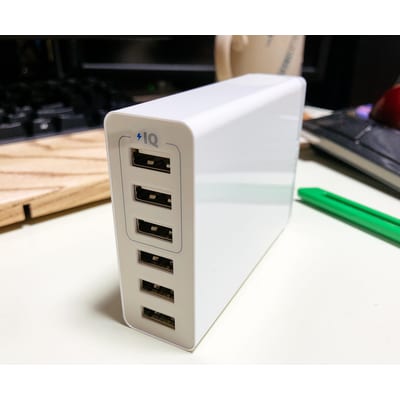
Anker PowerPort 6 Desktop Charging Station (60W, 6-Port)
Anker
One 6-port charger replaces a pile of wall warts, so phones, tablets, and accessories charge from a single tidy hub instead of hogging every outlet.
- Best for
- Consolidating multiple device chargers into one desktop hub.
- Skip if
- Those needing high-wattage USB-C laptop charging — check port specs.
- Watch out
- Confirm the port types/wattage match your devices (older USB-A on this model). Use quality cables.
Check Amazon for current price. Ratings and availability change. Verify on Amazon.
Check price on Amazon
Large Cable Management Box (Power Strip Hider)
Various
A large box hides a power strip and its knot of adapters inside, turning the ugliest part of any setup into one clean container on the floor or desk.
- Best for
- Concealing a power strip and adapter tangle in one spot.
- Skip if
- Setups needing airflow for high-heat bricks — don't overpack it.
- Watch out
- Don't overload or trap heat from high-wattage adapters. Keep away from moisture.
Check Amazon for current price. Ratings and availability change. Verify on Amazon.
Check price on AmazonKey buying criteria
- Port count. Enough for all your daily devices.
- Port type/wattage. USB-C PD for fast/laptop charging; check specs.
- Footprint. Compact enough for your desk or nightstand.
What to check on Amazon before buying
- Port count.
- USB-A vs USB-C / wattage.
- Total power.
- Footprint.
Setup and usage tips
- Match ports to devices. USB-C for phones/laptops that need it.
- Keep short cables. Reduces desktop clutter.
- Hide the brick. Route the station's cord into a box.
Common mistakes to avoid
- Wrong port types. Older USB-A won't fast-charge modern USB-C gear.
- Underpowered. Check total wattage across all ports.
- Cheap cables. Use quality cables to hit rated speeds.
How we choose
- We start from the buyer's actual problem, not the highest commission.
- We prioritize products with a long track record and broad availability.
- We call out who a product is wrong for, not just who it is right for.
- We tell you exactly what to verify on Amazon before you buy.
We only earn if you buy through our links, and it never changes the price you pay or what we recommend.
Final recommendation
The Anker PowerPort 6 consolidates several chargers into one 6-port hub. Confirm the port types fit your devices (this model is USB-A), and tuck its cord into a cable box for a clean look.
Get the free buying checklists
One useful email when we publish a new guide or printable. No spam, unsubscribe anytime.
Free download: Cable Cleanup Checklist (printable PDF)
Editorial guide last updated 2026-07-02. Product details require manual verification on Amazon before purchase.